Spec-Zone .ru
спецификации, руководства, описания, API
|
|
Spec-Zone .ru
спецификации, руководства, описания, API
|
By default, when text contains numeric values, those values are displayed using Latin (European) digits. When other Unicode digit shapes are preferred, use the
java.awt.font.NumericShaper class. The NumericShaper API enables you to display a numeric value represented internally as an ASCII value in any Unicode digit shape.
The following code snippet, from the
ArabicDigitsPanel(String fontname) {
    HashMap map = new HashMap();
    Font font = new Font(fontname, Font.PLAIN, 60);
    map.put(TextAttribute.FONT, font);
    map.put(TextAttribute.NUMERIC_SHAPING,
        NumericShaper.getShaper(NumericShaper.ARABIC));

    FontRenderContext frc = new FontRenderContext(null, false, false);
    layout = new TextLayout(text, map, frc);
}

// ...

public void paint(Graphics g) {
    Graphics2D g2d = (Graphics2D)g;
    layout.draw(g2d, 10, 50);
}
The NumericShaper instance for Arabic digits is fetched and placed into a HashMap for the
TextLayout.NUMERIC_SHAPING attribute key. The hash map is passed to the TextLayout instance. After rendering the text in the paint method, the digits are displayed in the desired script. In this example, the Latin digits, 0 through 9, are drawn as Arabic digits.

The previous example uses the NumericShaper.ARABIC constant to retrieve the desired shaper, but the
class provides constants for many languages. These constants are defined as bit masks and are referred to as the NumericShaper bit mask-based constants.
An alternative way to specify a particular set of digits is to use the
enumerated type (enum). This enum, introduced in the Java SE 7 release, also provides a set of
. Although these constants are defined using different mechanisms, the NumericShaper.ARABIC bit mask is functionally equivalent to the NumericShaper.Range.ARABIC enum, and there is a corresponding getShaper method for each constant type:
The
ArabicDigitsEnumPanel(String fontname) {
    HashMap map = new HashMap();
    Font font = new Font(fontname, Font.PLAIN, 60);
    map.put(TextAttribute.FONT, font);
    map.put(TextAttribute.NUMERIC_SHAPING,
        NumericShaper.getShaper(NumericShaper.Range.ARABIC));
    FontRenderContext frc = new FontRenderContext(null, false, false);
    layout = new TextLayout(text, map, frc);
}
Both getShaper methods accept a singleRange parameter. With either constant type, you can specify a range of script-specific digits. The bit mask-based constants can be combined using the OR operand, or you can create a set of NumericShaper.Range enums. The following shows how to define a range using each constant type:
NumericShaper.MONGOLIAN | NumericShaper.THAI |
NumericShaper.TIBETAN
EnumSet.of(
    NumericShaper.Range.MONGOLIAN,
    NumericShaper.Range.THAI,
    NumericShaper.Range.TIBETAN)
You can query the NumericShaper object to determine which ranges it supports using either the
getRanges method for bit mask-based shapers or the
method for enum-based shapers.
You can use either the traditional bit masked-based constants or the Range enum-based constants. Here are some considerations when deciding which to use:
Range API requires JDK 7 or later.Range API covers more Unicode ranges than the bit-masked API.Range API.The
You can accomplish this using one of the getContextualShaper methods:
The first two methods use the bit-mask constants, and the last two use the enum constants. The methods that accept a defaultContext parameter enable you to specify the initial shaper that is used when numeric values are displayed before text. When no default context is defined, any leading digits are displayed using Latin shapes.
The
ALL_RANGES bit mask, but the shaper does not specify a default context.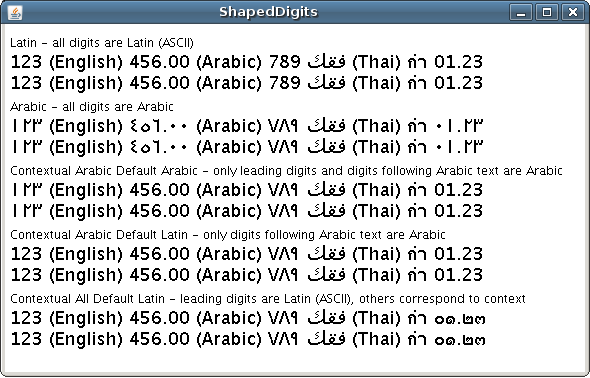
The following lines of code show how the shapers, if used, are defined:
NumericShaper arabic = NumericShaper.getShaper(NumericShaper.ARABIC);NumericShaper contextualArabic = NumericShaper.getContextualShaper(NumericShaper.ARABIC, NumericShaper.ARABIC);NumericShaper contextualArabicASCII = NumericShaper.getContextualShaper(NumericShaper.ARABIC);NumericShaper contextualAll = NumericShaper.getContextualShaper(NumericShaper.ALL_RANGES);See the
ShapedDigits.java example for further implementation details.
|