Spec-Zone .ru
спецификации, руководства, описания, API
|
|
Spec-Zone .ru
спецификации, руководства, описания, API
|
By invoking the methods provided by the
NumberFormat class, you can format numbers, currencies, and percentages according to
. The material that follows demonstrates formatting techniques with a sample program called
You can use the
NumberFormat methods to format primitive-type numbers, such as double, and their corresponding wrapper objects, such as
.
The following code example formats a according to . Invoking the method returns a locale-specific instance of . The method accepts the as an argument and returns the formatted number in a .
static public void displayNumber(Locale currentLocale) {

    Integer quantity = new Integer(123456);
    Double amount = new Double(345987.246);
    NumberFormat numberFormatter;
    String quantityOut;
    String amountOut;

    numberFormatter = NumberFormat.getNumberInstance(currentLocale);
    quantityOut = numberFormatter.format(quantity);
    amountOut = numberFormatter.format(amount);
    System.out.println(quantityOut + "   " + currentLocale.toString());
    System.out.println(amountOut + "   " + currentLocale.toString());
}
This example prints the following; it shows how the format of the same number varies with :
123 456   fr_FR
345 987,246   fr_FR
123.456   de_DE
345.987,246   de_DE
123,456   en_US
345,987.246   en_US
By default, when text contains numeric values, those values are displayed using Arabic digits. When other Unicode digit shapes are preferred, use the
class. The NumericShaper API enables you to display a numeric value represented internally as an ASCII value in any Unicode digit shape. See
In addition, some locales have variant codes that specify that Unicode digit shapes be used in place of Arabic digits, such as the locale for the Thai language. See the section Variant Code in Creating a Locale for more information.
If you are writing business applications, you will probably need to format and display currencies. You format currencies in the same manner as numbers, except that you call
getCurrencyInstance to create a formatter. When you invoke the
method, it returns a
that includes the formatted number and the appropriate currency sign.
This code example shows how to format currency in a locale-specific manner:
static public void displayCurrency( Locale currentLocale) {

    Double currencyAmount = new Double(9876543.21);
    Currency currentCurrency = Currency.getInstance(currentLocale);
    NumberFormat currencyFormatter =
        NumberFormat.getCurrencyInstance(currentLocale);

    System.out.println(
        currentLocale.getDisplayName() + ", " +
        currentCurrency.getDisplayName() + ": " +
        currencyFormatter.format(currencyAmount));
}
The output generated by the preceding lines of code is as follows:
French (France), Euro: 9 876 543,21 €
German (Germany), Euro: 9.876.543,21 €
English (United States), US Dollar: $9,876,543.21
At first glance, this output may look wrong to you because the numeric values are all the same. Of course, 9 876 543,21 € is not equivalent to $9,876,543.21. However, bear in mind that the class is unaware of exchange rates. The methods belonging to the class format currencies but do not convert them.
Note that the class is designed so that there is never more than one instance for any given currency. Therefore, there is no public constructor. As demonstrated in the previous code example, you obtain a instance using the methods.
The sample class. (Note that this sample does not convert currency values.) The following uses the en-US locale:
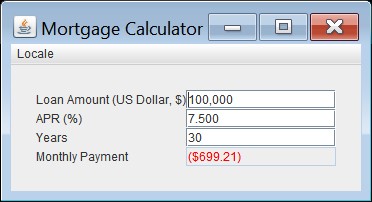
The following uses the en-UK locale:
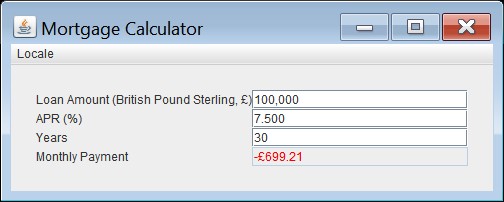
The sample
The
Currency class contains other methods to retrieve currency related information:
: Returns all available currencies in the JDK
: Returns the ISO 4217 numeric code for a instance
: Returns the symbol for a instance. You can optionally specify as an argument a object. Consider the following excerpt:
Locale enGBLocale =
    new Locale.Builder().setLanguage("en").setRegion("GB").build();

Locale enUSLocale =
    new Locale.Builder().setLanguage("en").setRegion("US").build();

Currency currencyInstance = Currency.getInstance(enUSLocale);

System.out.println(
    "Symbol for US Dollar, en-US locale: " +
    currencyInstance.getSymbol(enUSLocale));

System.out.println(
    "Symbol for US Dollar, en-UK locale: " +
    currencyInstance.getSymbol(enGBLocale));
The excerpt prints the following:
Symbol for US Dollar, en-US locale: $
Symbol for US Dollar, en-UK locale: USD
This excerpt demonstrates that the symbol of a currency can vary depending on the locale.
: Returns the display name for a instance. Like the method, you can optionally specify a object.
is a standard published by the International Standards Organization. It specifies three-letter codes (and equivalent three-digit numeric codes) to represent currencies and funds. This standard is maintained by an external agency and is released independent of the Java SE platform.
Suppose that a country adopts a different currency and the ISO 4217 maintenance agency releases a currency update. To implement this update and thereby supercede the default currency at runtime, create a properties file named <JAVA_HOME>/lib/currency.properties. This file contains the key/value pairs of the
country code, and the ISO 4217 currency data. The value part consists of three comma-separated ISO 4217 currency values: an alphabetic code, a numeric code, and a minor unit. Any lines beginning with the hash character (#), are treated as comment lines. For example:
# Sample currency property for Canada
CA=CAD,124,2
CAD stands for the Canadian dollar; 124 is the numeric code for the Canadian dollar; and 2 is the minor unit, which is the number of decimal places the currency requires to represent fractional currencies. For example, the following properties file will supercede the default Canadian currency to a Canadian dollar that does not have any units smaller than the dollar:
CA=CAD,124,0
You can also use the methods of the class to format percentages. To get the locale-specific formatter, invoke the method. With this formatter, a decimal fraction such as 0.75 is displayed as 75%.
The following code sample shows how to format a percentage.
static public void displayPercent(Locale currentLocale) {

    Double percent = new Double(0.75);
    NumberFormat percentFormatter;
    String percentOut;

    percentFormatter = NumberFormat.getPercentInstance(currentLocale);
    percentOut = percentFormatter.format(percent);
    System.out.println(percentOut + "   " + currentLocale.toString());
}
This sample prints the following:
75 %   fr_FR
75%   de_DE
75%   en_US
|