
Spec-Zone .ru
спецификации, руководства, описания, API
|
|
Spec-Zone .ru
спецификации, руководства, описания, API
|
To configure a DSN on Mac OS X, you can either use the command-line utility (myodbc-installer
with connector/ODBC 5.1, or myodbc3i with connector/OCBC 3.51),
edit the odbc.ini file within the Library/ODBC
directory of the user, or use the ODBC Administrator GUI. If you have Mac OS X 10.2 or earlier, refer to Section 22.1.4.5, "Configuring a
Connector/ODBC DSN on Unix". Select whether to create a User DSN or a System DSN. When adding a System
DSN, you might need to authenticate with the system. Click the padlock and enter a user and password with
administrator privileges.
For correct operation of ODBC Administrator, ensure that the /Library/ODBC/odbc.ini file used to set up ODBC connectivity and DSNs are writable
by the admin group. If this file is not writable by this group, then the ODBC
Administrator may fail, or may appear to work but not generate the correct entry.
There are known issues with the Mac OS X ODBC Administrator and Connector/ODBC that may prevent you
from creating a DSN using this method. In this case, use the command line or edit the odbc.ini file directly. Note that existing DSNs or those that you create
using the myodbc3i or myodbc-installer
tool can still be checked and edited using ODBC Administrator.
To create a DSN using the myodbc3i utility, you need only specify the DSN type and the DSN connection string. For example:
shell> myodbc3i -a -s -t"DSN=mydb;DRIVER=MySQL ODBC 3.51 Driver;SERVER=mysql;USER=username;PASSWORD=pass"
To use ODBC Administrator:
Open the ODBC Administrator from the Utilities folder
in the Applications folder.
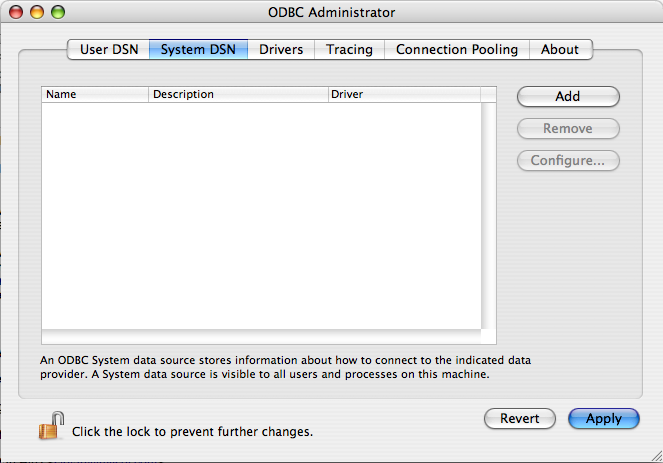
On the User DSN or System DSN panel, click .
Select the Connector/ODBC driver and click .
You will be presented with the Data Source Name
dialog. Enter the Data Source Name and an optional Description
for the DSN.
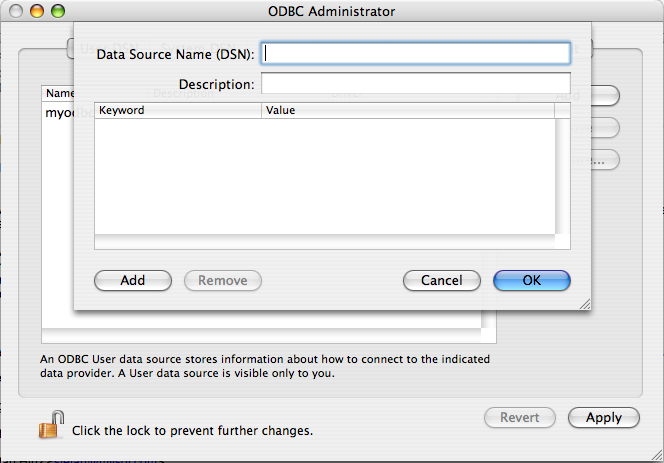
Click to add a new keyword/value pair to the
panel. Configure at least four pairs to specify the server, username, password and database connection parameters. See Section
22.1.4.2, "Connector/ODBC Connection Parameters".
Click to add the DSN to the list of configured data source names.
A completed DSN configuration may look like this:
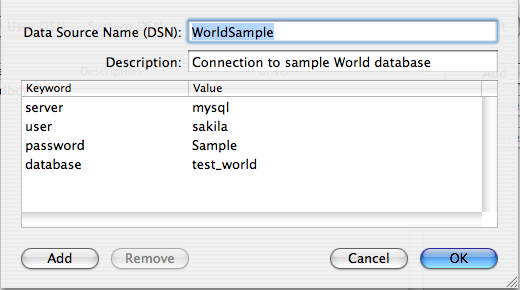
You can configure other ODBC options in your DSN by adding further keyword/value pairs and setting the corresponding values. See Section 22.1.4.2, "Connector/ODBC Connection Parameters".