Создание приложения на Kotlin, отвечающего на вопросы с помощью Spring AI — руководство
В этом руководстве вы узнаете, как создать приложение на Kotlin, которое подключается к LLM с помощью Spring AI, хранит документы в векторной базе данных и отвечает на вопросы, используя контекст из этих документов.
В этом руководстве вы будете использовать следующие инструменты:
Spring Boot в качестве основы для настройки и запуска веб-приложения.
Spring AI для взаимодействия с LLM и поиска с учетом контекста.
IntelliJ IDEA для генерации проекта и реализации логики приложения.
Qdrant в качестве векторной базы данных для поиска по сходству.
Docker для локального запуска Qdrant.
OpenAI в качестве поставщика LLM.
Перед началом работы
-
Скачайте и установите последнюю версию IntelliJ IDEA и используйте подписку Ultimate.
Создайте ключ API OpenAI на платформе OpenAI, чтобы получить доступ к API.
Установите Docker, чтобы локально запустить векторную базу данных Qdrant.
-
После установки Docker откройте терминал и выполните следующую команду, чтобы запустить контейнер:
docker run -p 6333:6333 -p 6334:6334 qdrant/qdrant
Создание проекта
Создайте новый проект Spring Boot в IntelliJ IDEA с подпиской Ultimate:
В IntelliJ IDEA выберите File | New | Project.
На панели слева выберите New Project | Spring Boot.
-
Укажите следующие поля и параметры в окне New Project:
Name: springAIDemo
Language: Kotlin
-
Type: Gradle - Kotlin
Package name: org.example.springaidemo
-
JDK: Java JDK
-
Java: 17
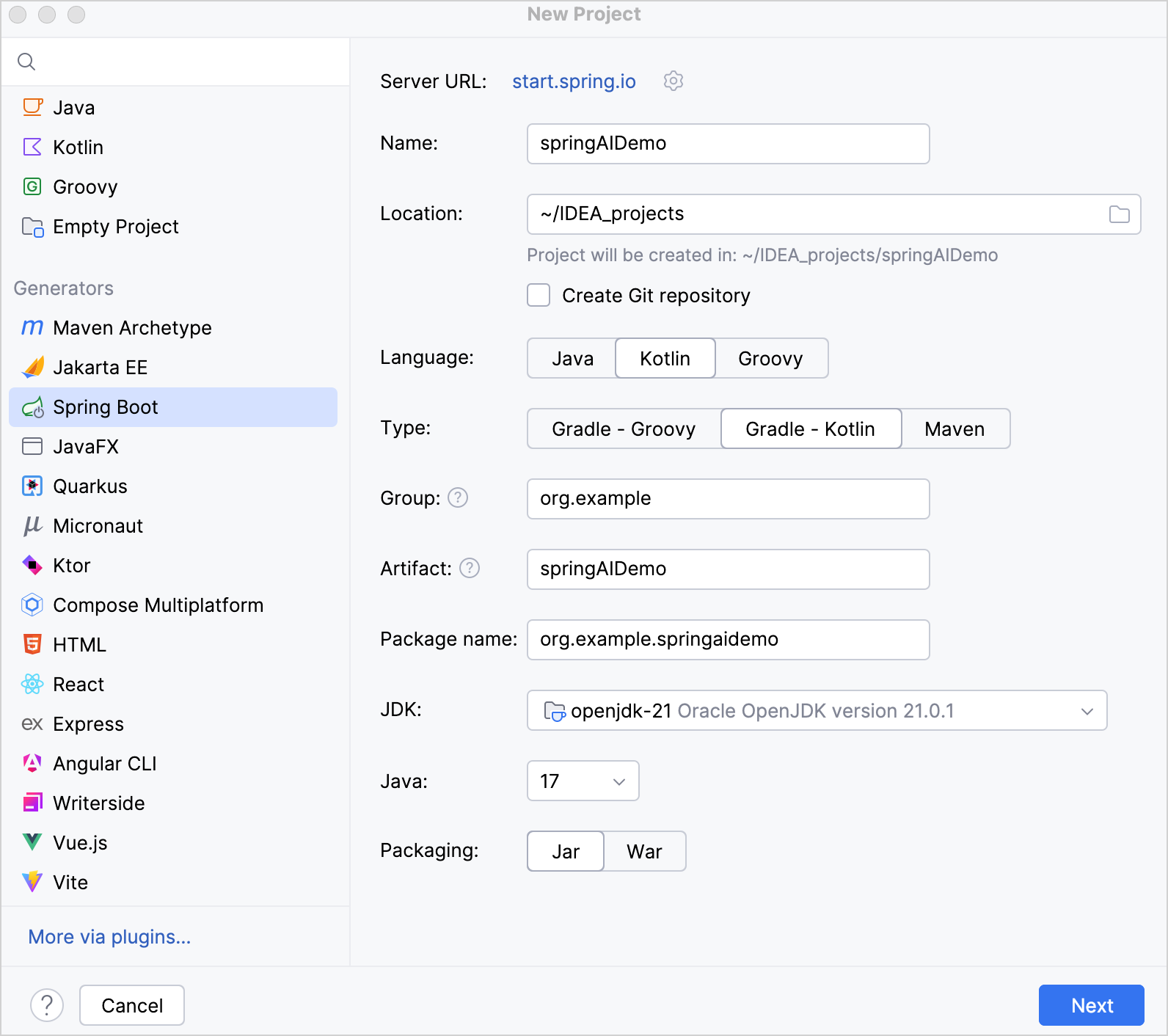
Убедитесь, что все поля заполнены, и нажмите Next.
В поле Spring Boot выберите последнюю стабильную версию Spring Boot.
-
Выберите следующие зависимости, необходимые для этого руководства:
Web | Spring Web
AI | OpenAI
SQL | Qdrant Vector Database
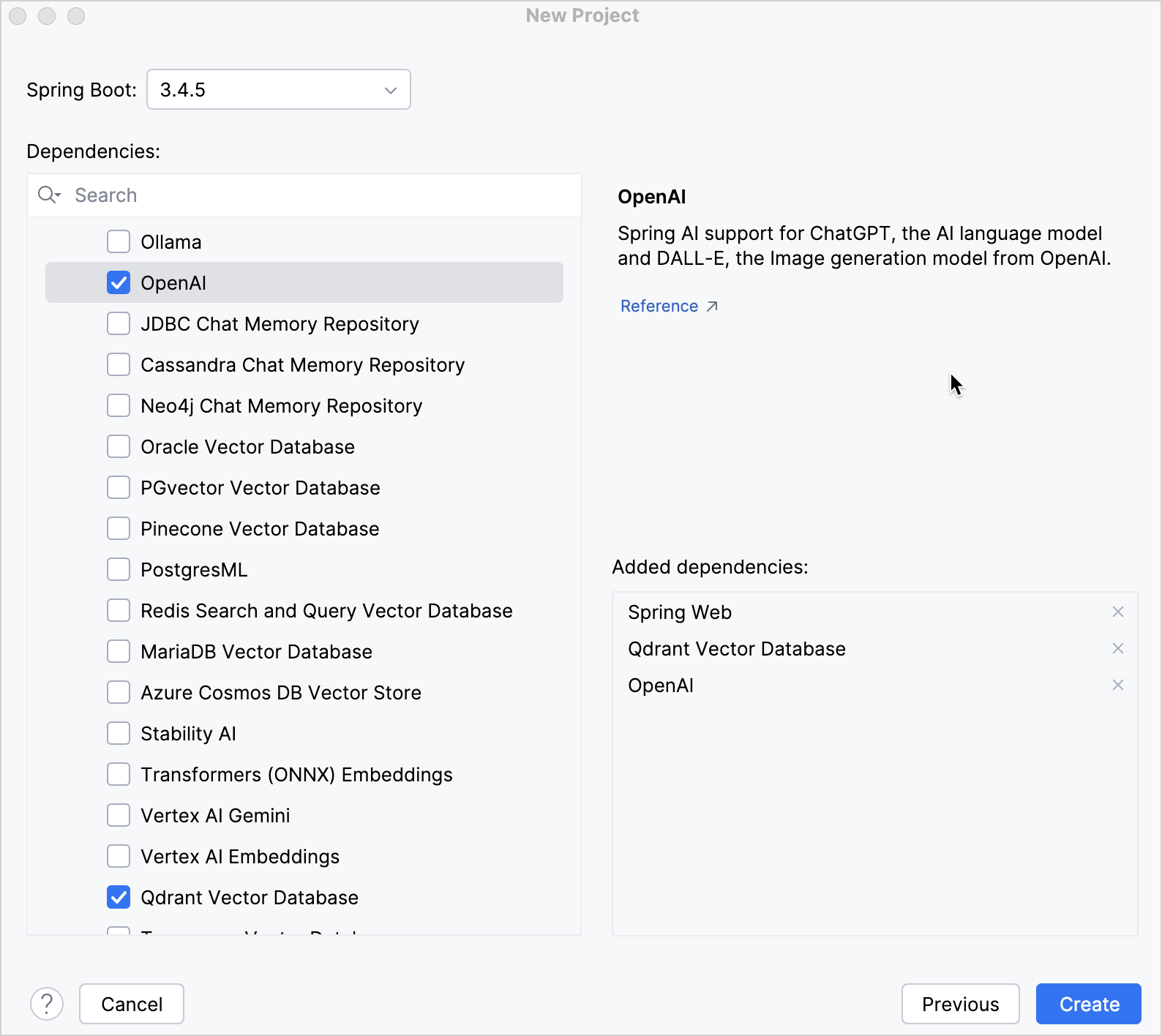
-
Нажмите Create, чтобы создать и настроить проект.
После этого в Project view будет видна следующая структура:
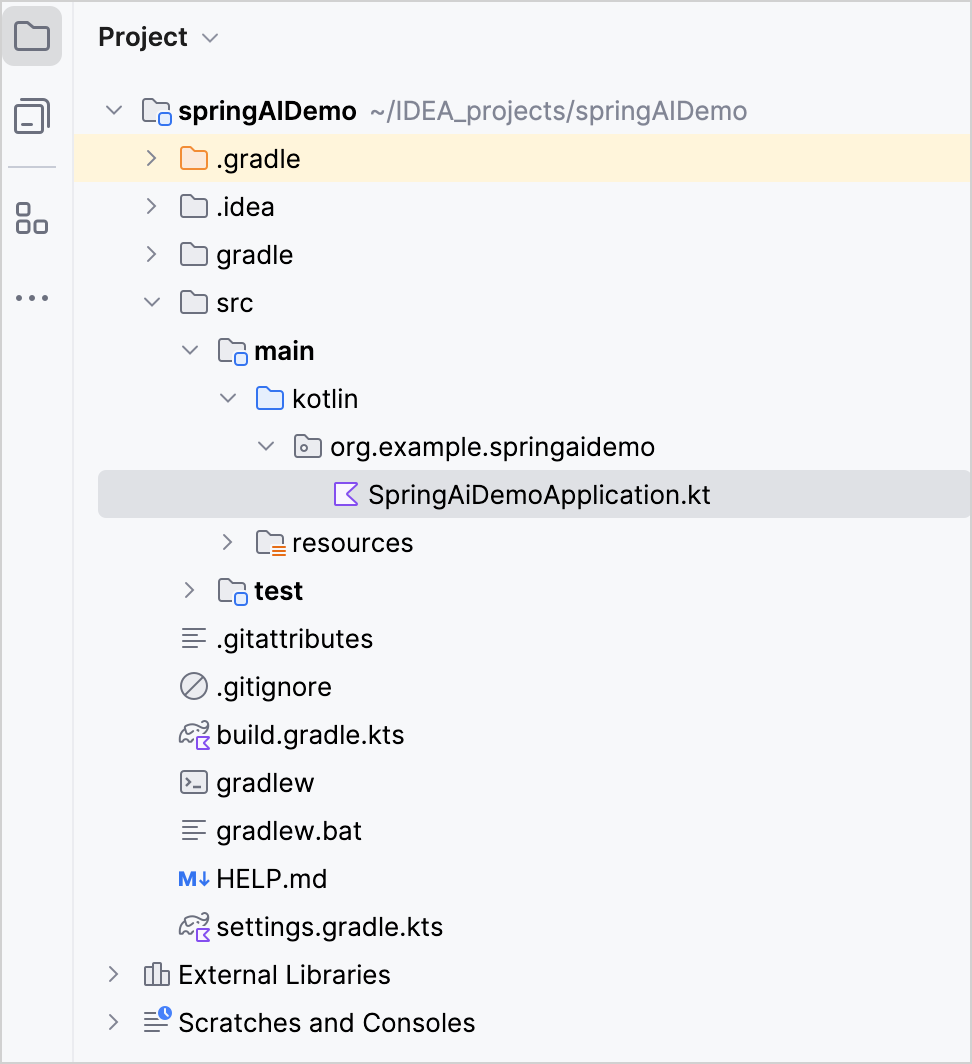
Сгенерированный проект Gradle соответствует стандартной структуре каталогов Maven:
В папке
main/kotlinнаходятся пакеты и классы приложения.Точкой входа приложения является метод
main()в файлеSpringAiDemoApplication.kt.
Обновление конфигурации проекта
-
Обновите файл сборки Gradle
build.gradle.ktsследующим образом:plugins { kotlin("jvm") version "2.4.20" kotlin("plugin.spring") version "2.4.20" // Rest of the plugins } -
Задайте для
springAiVersionзначение2.0.0:extra["springAiVersion"] = "2.0.0"
Нажмите кнопку Sync Gradle Changes, чтобы синхронизировать файлы Gradle.
-
Обновите файл
src/main/resources/application.propertiesследующим образом:# OpenAI spring.ai.openai.api-key=YOUR_OPENAI_API_KEY spring.ai.openai.chat.model=gpt-4o-mini spring.ai.openai.embedding.model=text-embedding-ada-002 # Qdrant spring.ai.vectorstore.qdrant.host=localhost spring.ai.vectorstore.qdrant.port=6334 spring.ai.vectorstore.qdrant.collection-name=kotlinDocs spring.ai.vectorstore.qdrant.initialize-schema=true
-
Запустите файл
SpringAiDemoApplication.kt, чтобы запустить приложение Spring Boot. После запуска откройте в браузере страницу коллекций Qdrant, чтобы увидеть результат: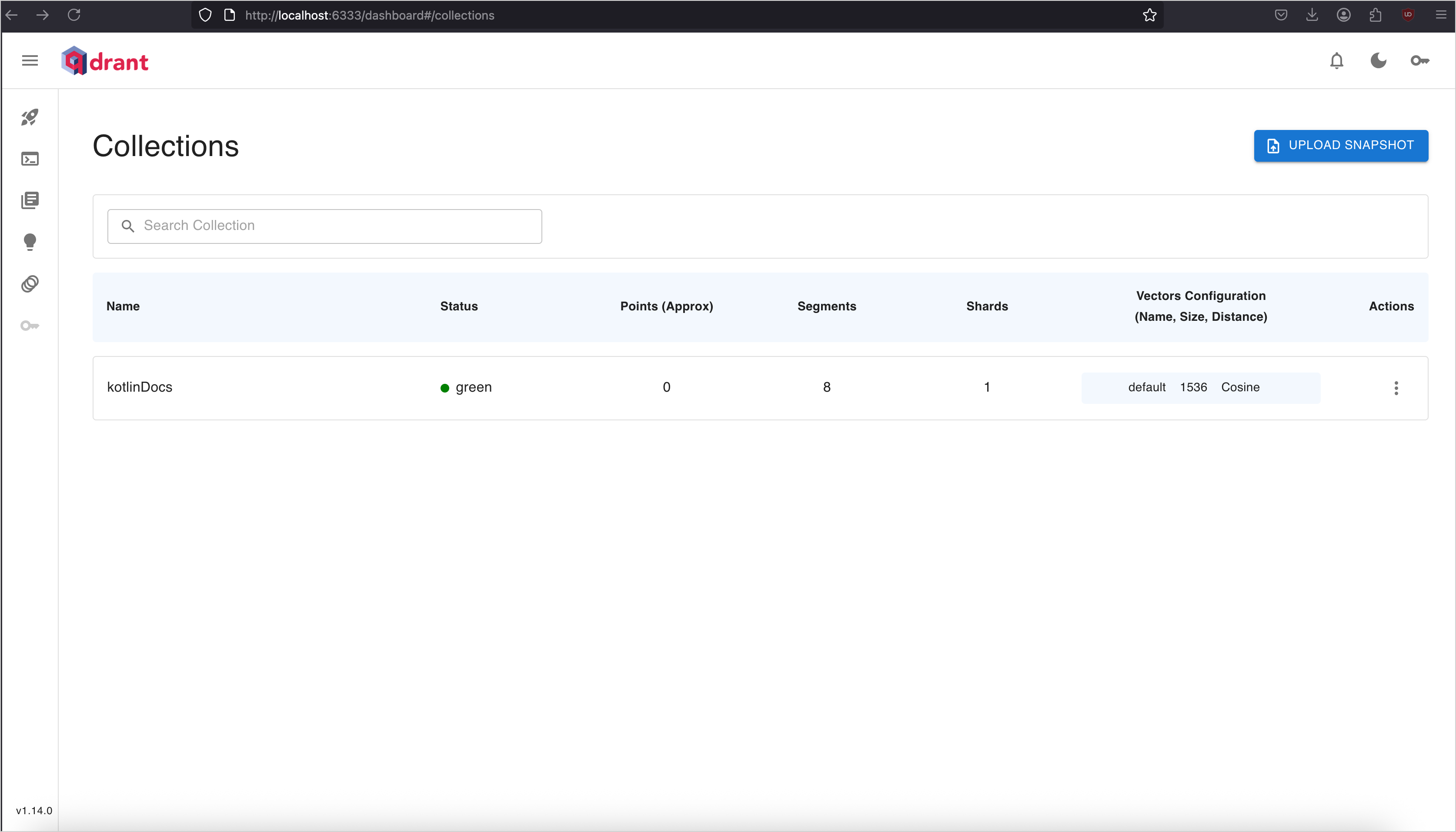
Создание контроллера для загрузки и поиска документов
Создайте Spring @RestController для поиска документов и их хранения в коллекции Qdrant:
-
В каталоге
src/main/kotlin/org/example/springaidemoсоздайте файл с именемKotlinSTDController.ktи добавьте следующий код:package org.example.springaidemo // Imports the required Spring and utility classes import org.slf4j.LoggerFactory import org.springframework.ai.document.Document import org.springframework.ai.vectorstore.SearchRequest import org.springframework.ai.vectorstore.VectorStore import org.springframework.web.bind.annotation.GetMapping import org.springframework.web.bind.annotation.PostMapping import org.springframework.web.bind.annotation.RequestMapping import org.springframework.web.bind.annotation.RequestParam import org.springframework.web.bind.annotation.RestController import org.springframework.web.client.RestTemplate import kotlin.uuid.ExperimentalUuidApi import kotlin.uuid.Uuid @RestController @RequestMapping("/kotlin") class KotlinSTDController( private val restTemplate: RestTemplate, private val vectorStore: VectorStore, ) { private val logger = LoggerFactory.getLogger(this::class.java) @OptIn(ExperimentalUuidApi::class) @PostMapping("/load-docs") fun load() { // Loads a list of documents from the Kotlin documentation val kotlinStdTopics = listOf( "collections-overview", "constructing-collections", "iterators", "ranges", "sequences", "collection-operations", "collection-transformations", "collection-filtering", "collection-plus-minus", "collection-grouping", "collection-parts", "collection-elements", "collection-ordering", "collection-aggregate", "collection-write", "list-operations", "set-operations", "map-operations", "read-standard-input", "opt-in-requirements", "scope-functions", "time-measurement", ) // Base URL for the documents val url = "https://raw.githubusercontent.com/JetBrains/kotlin-web-site/refs/heads/master/docs/topics/" // Retrieves each document from the URL and adds it to the vector store kotlinStdTopics.forEach { topic -> val data = restTemplate.getForObject("$url$topic.md", String::class.java) data?.let { it -> val doc = Document.builder() // Builds a document with a random UUID .id(Uuid.random().toString()) .text(it) .metadata("topic", topic) .build() vectorStore.add(listOf(doc)) logger.info("Document $topic loaded.") } ?: logger.warn("Failed to load document for topic: $topic") } } @GetMapping("docs") fun query( @RequestParam query: String = "operations, filtering, and transformations", @RequestParam topK: Int = 2 ): List<Document>? { val searchRequest = SearchRequest.builder() .query(query) .topK(topK) .build() val results = vectorStore.similaritySearch(searchRequest) logger.info("Found ${results?.size ?: 0} documents for query: '$query'") return results } } -
Обновите файл
SpringAiDemoApplication.kt, чтобы объявить бинRestTemplate:package org.example.springaidemo import org.springframework.boot.autoconfigure.SpringBootApplication import org.springframework.boot.runApplication import org.springframework.context.annotation.Bean import org.springframework.web.client.RestTemplate @SpringBootApplication class SpringAiDemoApplication { @Bean fun restTemplate(): RestTemplate = RestTemplate() } fun main(args: Array<String>) { runApplication<SpringAiDemoApplication>(*args) } Запустите приложение.
-
В терминале отправьте POST-запрос к конечной точке
/kotlin/load-docs, чтобы загрузить документы:curl -X POST http://localhost:8080/kotlin/load-docs
-
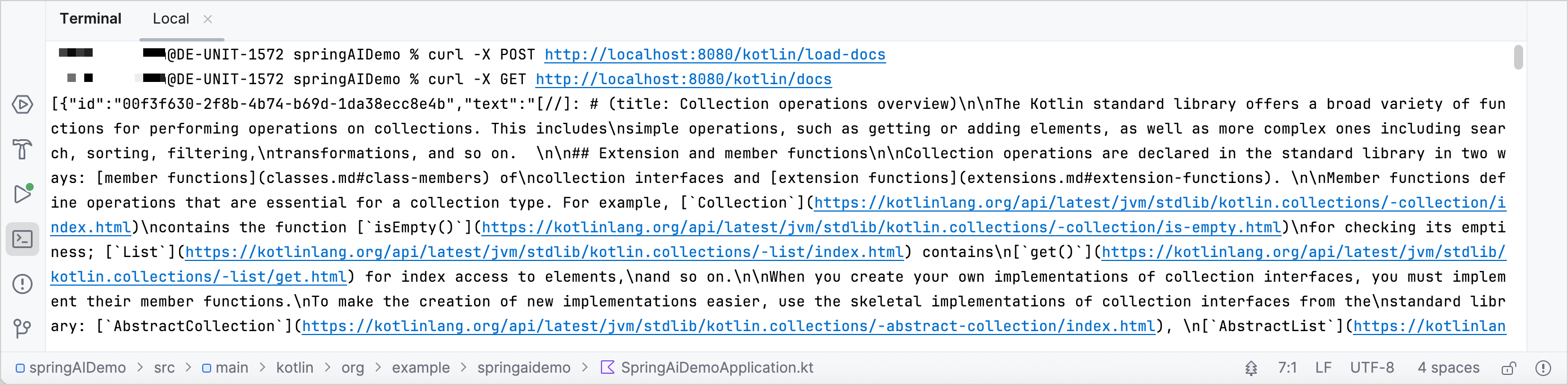
После загрузки документов их можно искать с помощью GET-запроса:
curl -X GET http://localhost:8080/kotlin/docs
Реализация конечной точки AI-чата
После загрузки документов остается добавить конечную точку, которая будет отвечать на вопросы, используя документы из Qdrant и поддержку генерации с дополненной выборкой (RAG) в Spring AI:
-
Откройте файл
KotlinSTDController.ktи импортируйте следующие классы:import org.springframework.ai.chat.client.ChatClient import org.springframework.ai.chat.client.advisor.SimpleLoggerAdvisor import org.springframework.ai.chat.client.advisor.vectorstore.QuestionAnswerAdvisor import org.springframework.ai.chat.prompt.Prompt import org.springframework.ai.chat.prompt.PromptTemplate import org.springframework.web.bind.annotation.RequestBody
-
Объявите класс данных
ChatRequest:// Represents the request payload for chat queries data class ChatRequest(val query: String, val topK: Int = 3)
-
Добавьте
ChatClient.Builderв список параметров конструктора контроллера:class KotlinSTDController( // Provides the builder for creating the ChatClient private val chatClientBuilder: ChatClient.Builder, private val restTemplate: RestTemplate, private val vectorStore: VectorStore, ) -
Внутри класса контроллера создайте экземпляр
ChatClient:// Builds the chat client with a simple logging advisor private val chatClient = chatClientBuilder.defaultAdvisors(SimpleLoggerAdvisor()).build()
-
В конце файла
KotlinSTDController.ktдобавьте новую конечную точкуchatAsk()со следующей логикой:@PostMapping("/chat/ask") fun chatAsk(@RequestBody request: ChatRequest): String? { // Defines the prompt template with placeholders val promptTemplate = PromptTemplate( """ {query}. Please provide a concise answer based on the "Kotlin standard library" documentation. """.trimIndent() ) // Creates the prompt by substituting placeholders with actual values val prompt: Prompt = promptTemplate.create(mapOf("query" to request.query)) // Configures the retrieval advisor to augment the query with relevant documents val retrievalAdvisor = QuestionAnswerAdvisor.builder(vectorStore) .searchRequest( SearchRequest.builder() .similarityThreshold(0.7) .topK(request.topK) .build() ) .promptTemplate(promptTemplate) .build() // Sends the prompt to the LLM with the retrieval advisor and retrieves the generated content val response = chatClient.prompt(prompt) .advisors(retrievalAdvisor) .call() .content() logger.info("Chat response generated for query: '${request.query}'") return response } Запустите приложение.
-
В терминале отправьте POST-запрос к новой конечной точке, чтобы увидеть результаты:
curl -X POST "http://localhost:8080/kotlin/chat/ask" \
     -H "Content-Type: application/json" \
     -d '{"query": "What are the performance implications of using lazy sequences in Kotlin for large datasets?", "topK": 3}'
Поздравляем! Теперь у вас есть приложение на Kotlin, которое подключается к OpenAI и отвечает на вопросы, используя контекст из документации, сохраненной в Qdrant. Попробуйте использовать разные запросы или импортировать другие документы, чтобы изучить дополнительные возможности.
Готовый проект можно посмотреть в репозитории Spring AI demo на GitHub.
Что дальше
Изучите другие примеры Spring AI в разделе Kotlin AI Examples
Создание приложения для управления задачами с помощью Spring Boot и Claude
© 2010–2026 JetBrains s.r.o. and Kotlin Programming Language contributors
Licensed under the Apache License, Version 2.0.
https://kotlinlang.org/docs/spring-ai-guide.html


